Showing posts with label BOSH. Show all posts

Deploying apps in Cloud Foundry


The best place to start with Cloud Foundry is to get the experience of deploying applications locally in the machine. This is what we called 'Mirco Cloud Foundry'.  For a novice Cloud Foundry developer, a full scale PaaS deployment is not possible and it is not an affordable choice. To address this issue, Cloud Foundry team released BoshLite which provides developers a method to deploy it locally in their machine.

It is important to understand the meaning of several terms prior to the deployment process. So let's concentrate on the terms, stemcell, release and deployment.

What is a stemcell?

Stemcell is a versioned Operating System image wrapped with IaaS specific packaging. A typical stemcell contains a bare minimum OS skeleton, a few common utilities pre-installed, a BOSH Agent, and a few configuration files to securely configure the OS by default. 

This clear separation between base Operating System and later-installed software is what makes stemcells a powerful concept. Stemcells for one OS (e.g. all Ubuntu Trusty stemcells) are exactly the same for all infrastructures. This property of stemcells allows BOSH users to quickly and reliably switch between different infrastructures . The Cloud Foundry BOSH team is responsible for producing and maintaining an official set of stemcells. 

By introducing the concept of a stemcell, the following problems have been solved: 

                           - Capturing a base OS image
                           - Versioning changes to the OS omage
                           - Reusing base OS image across Vms of different types
                           - Reusing base OS images across different IaaS

What is a release?

A release is a versioned collection of configuration properties, configuration templates, start up scripts, source code, binary artifacts and anything else required to build and deploy software in a reproducible way.A release is the layer placed on top of a stemcell. They are self-contained and provide very specific software for the purpose of that release. For example, a Redis release might include start-up and shutdown scripts for redis-server. 

The following tasks are done by a release: 

                          - Capturing all needed configuration options and scripts for deployment of the software 
                          - Recording and keeping track of all dependencies for the software 
                          - Versioning and keeping track of software releases
                          - Creating releases that can be IaaS agnostic 
                          - Creating releases that are self-contained and do not require internet access for deployment.

What is a deployment?

A deployment is a collection of VMs, built from a stemcell that has been populated with specific releases and disks that keep persistent data.These resources are created based on a manifest file in the IaaS and managed by the BOSH Director, a centralized management server.

The deployment process begins with deciding which Operating System images (stemcells) need to be used and which software (releases) need to be deployed. Combination of stemcells, releases, and operator-specified properties are contained in a human readable file called a deployment manifest. When a deployment manifest is uploaded to a BOSH Director, requested resources are allocated and stored. These resources form a deployment. A user can manage a deployment via its deployment manifest. A deployment manifest contains all needed information for tracking, managing, and updating software on the deployment’s VMs. 


Other than the above terms, there are some specific concepts relevant to user access control. Cloud Foundry uses role-based access control (RBAC), with each role granting permissions in either  an org or a space.

Orgs, Spaces, Roles and Permissions 

Orgs 

Development account that an individual or multiple collaborators can own and use. All collaborators access an org with user accounts. Collaborators in an org share a resource quota plan, applications, services availability, and custom domains. 

User Accounts

Represents an individual person within the context of a Cloud Foundry installation. A user can have different roles in different spaces within an org.

Spaces

Every application and service is scoped to a space. Each org contains at least one space. A space provides users with access to a shared location for application development, deployment, and maintenance. 

Roles and Permissions

A user can have one or more roles. The combination of these roles defines the user’s overall permissions in the org and within specific spaces. Then there are different roles like org manger, org auditor, billing manger, space manger, space developer, space auditor.


Install BOSH Lite

We are going to use bosh lite here. bosh-lite is a vagrant VM that comes with pre-installed BOSH server (Director). Once VM with Director is running we are going to use BOSH CLI to send commands to the Director.

Now we are almost ready to deploy applications in Cloud Foundry. After figuring out all the bits and pieces, I wrote down the following procedure of steps so anyone with an average IT knowledge who wishes to try out Cloud Foundry can get up and running a bit quicker than I did.

The main tutorial for deploying Cloud Foundry on Vagrant can be found on the following URL:
This tutorial is aimed at Linux users and comes with commands and scripts for such systems. I have listed the steps that I used to deploy Cloud Foundry and elaborated where I deviated from the tutorial.

Note:

This installation is only for 64-bit systems, as the stem cells are packaged as 64-bit images. This also means that this installation will only work on systems that support VT-x or some other hardware virtualization technology (AMD-V for AMD machines). It will also not work if you try and run this setup on a virtual machine, since you will be required another VM. Currently, VT-X can only be used by a single virtual machine.

Step1: Install latest version of bosh_cli

BOSH CLI is a command line interface to the Director. It is distributed as a Ruby gem.First we need to install Bosh-Lite. So we need to prepare the environment for that. As the first step, we install latest version of bosh_cli which is the Command Line Interface tool to interact with Bosh_Lite director (VM running the Bosh_Lite server). The README.md mentions the following command to install bosh_cli using gem.

$ gem install bosh_cli --no-ri --no-rdoc
This will give the following output. 
nanduni@nanduni-TECRA-M11:~$ gem install bosh_cli --no-ri --no-rdoc
Fetching: jmespath-1.1.3.gem (100%)
Successfully installed jmespath-1.1.3
Fetching: aws-sdk-core-2.2.0.gem (100%)
Successfully installed aws-sdk-core-2.2.0
Fetching: aws-sdk-resources-2.2.0.gem (100%)
Successfully installed aws-sdk-resources-2.2.0
Fetching: little-plugger-1.1.4.gem (100%)
Successfully installed little-plugger-1.1.4
Fetching: logging-1.8.2.gem (100%)
Successfully installed logging-1.8.2
Fetching: semi_semantic-1.1.0.gem (100%)
Successfully installed semi_semantic-1.1.0
Fetching: bosh_common-1.3184.0.gem (100%)
Successfully installed bosh_common-1.3184.0
Fetching: httpclient-2.4.0.gem (100%)
Successfully installed httpclient-2.4.0
Fetching: blobstore_client-1.3184.0.gem (100%)
Successfully installed blobstore_client-1.3184.0
Fetching: bosh-template-1.3184.0.gem (100%)
Successfully installed bosh-template-1.3184.0
Fetching: minitar-0.5.4.gem (100%)
Successfully installed minitar-0.5.4
Fetching: netaddr-1.5.0.gem (100%)
Successfully installed netaddr-1.5.0
Fetching: net-ssh-2.9.2.gem (100%)
Successfully installed net-ssh-2.9.2
Fetching: net-scp-1.1.2.gem (100%)
Successfully installed net-scp-1.1.2
Fetching: net-ssh-gateway-1.2.0.gem (100%)
Successfully installed net-ssh-gateway-1.2.0
Fetching: progressbar-0.9.2.gem (100%)
Successfully installed progressbar-0.9.2
Fetching: sshkey-1.7.0.gem (100%)
Successfully installed sshkey-1.7.0
Fetching: terminal-table-1.4.5.gem (100%)
Successfully installed terminal-table-1.4.5
Fetching: bosh_cli-1.3184.0.gem (100%)
Successfully installed bosh_cli-1.3184.0
19 gems installed

If this command does not work out for you, try the following command.
$ gem install --user-install bosh_cli


Step2: Install Vagrant

If you are not familiar about Vagrant and VirtualBox, go through my blog post

Check that you have Vagrant installed in your machine by using the following command.

$ vagrant --version
Vagrant 1.7.4


Step3: Install VirtualBox

Check that you have Vagrant installed in your machine by using the following command.
$ VBoxManage --version
5.0.10r104061


Step4: Clone the repository

$ cd ~/workspace
$ git clone https://github.com/cloudfoundry/bosh-lite


Step5: Start Vagrant

Navigate into the cloned repository. Start Vagrant from the base directory of this repository, which contains the Vagrantfile. The most recent version of the BOSH Lite boxes will be downloaded by default from the Vagrant Cloud when you run vagrant up. If you have already downloaded an older version you will be warned that your version is out of date.

$ vagrant up --provider=virtualbox


Step6: Target director

Let CLI know about bosh-lite Director. So target the BOSH Director.
If you work behind a proxy, exclude both the VM's private IP and xip.io by setting no_proxy.

$ bosh target 192.168.50.4 lite
Target set to 'Bosh Lite Director'


Step6: Login

Now login to Bosh. When prompted to log in, use admin/admin.
$ bosh login
Your username: admin
Enter password: *****
Logged in as 'admin'

If you logged in successfully, it should display the message that you have logged in successfully.


Step7: Add route entries


This is an important step that you should not miss. When I was installing Bosh Lite, I accidentally missed this step and it took me hours to find out the error.
 
Add a set of route entries to your local route table to enable direct Warden container access every time your networking gets reset (e.g. reboot or connect to a different network). Your sudo password may be required.

$ bin/add-route


Start deployment


Now that you have Bosh Lite installed in your machine, you require some kind of application to start with.  You have already completed the steps of preparing the required environment for deployment. I followed this tutorial to start with. It is guide to using BOSH.
This tutorial gives a simple introduction to BOSH. If you have never deployed with BOSH or never heard about it that step-by-step guide will bring you up to speed.

Before we proceed we need to understand what BOSH needs to deploy software.


What to deploy

Software that is deployed with BOSH needs to be packaged in a special format called release. For each service that will be deployed release needs to contain its source files, configuration files, installation scripts, etc. For example, for a redis-release, the source code for redis, redis configuration defaults and redis init scripts are part of the release.

How to deploy
Each BOSH deployment needs to provide a specially structured configuration file - deployment manifest. This file defines what resources are going to be deployed, what services are going to be running on each of resources and properties that will be passed to services configuration files. For example, for a redis deployment manifest, there are entries for how many and what size redis VMs there should be and how redis should be configured.

Step1: Create Bosh release

We are going to use a simple BOSH release that deploys a sinatra server. Clone the repository containing the application.

$ git clone https://github.com/mariash/learn-bosh-release learn-bosh-release
$ cd learn-bosh-release
$ bosh create release
What happens when you create a release is that it downloads all the ruby/bundler and other necessary packages and libraries for the release. Then if the packages are downloaded properly, then it will request a development release name. I gave it the name 'learn-bosh' . Then within the DevReleases folder, it will create a folder with that release name. This folder contains the release manifest, which is a yaml file.

Step2: Upload release

Upload generated release to Director.
$ bosh upload release


Step3: Check release

Now that you can check the uploaded releases.

$ bosh releases
Then it will show an output like this.

Acting as user 'admin' on 'Bosh Lite Director'
+------------+----------+-------------+
| Name | Versions | Commit Hash |
+------------+----------+-------------+
| learn-bosh | 0+dev.1 | 1867f1d2 |
+------------+----------+-------------+ 
Releases total: 1

Step4: Set deployment manifest

Deployment manifest specifies what services to deploy, their properties and resources configuration. The manifest in the folder contains a placeholder director_uuid that needs replacing. In order to obtain the correct uuid, use the following command.
$ bosh status --uuid

Or else use bosh status command and you will easily find the uuid.
Now set the deployment manifest.

$ bosh deployment manifest.yml
Deployment set to '...learn-bosh-release/manifest.yml'


Step5: Upload stemcell

A Stemcell is an operating system image that BOSH uses to create VMs. Official BOSH stemcells are maintained with security updates at bosh.io.

Upload stemcell to Director using the following command.

$ wget --content-disposition https://bosh.io/d/stemcells/bosh-warden-boshlite-ubuntu-trusty-go_agent
$ bosh upload stemcell bosh-stemcell-3147-warden-boshlite-ubuntu-trusty-go_agent.tgz


Step6: Check stemcells

You can verify the uploaded stemcells using the following command.
$ bosh stemcells 
Acting as user 'admin' on 'Bosh Lite Director'
+---------------------------------------------+---------+
(*) Currently in-use
Stemcells total: 1
| Name | Version |
+---------------------------------------------+---------+
| bosh-warden-boshlite-ubuntu-trusty-go_agent | 3147 |
+---------------------------------------------+---------+


Step7: Deploy

Use the following command to deploy.

$ bosh deploy
See the list of deployed VMs as it was specified in manifest. 
$ bosh vms ...
+-----------+---------+---------------+------------+
| Job/index | State | Resource Pool | IPs |
+-----------+---------+---------------+------------+
| app/0 | running | default | 10.244.0.2 |
+-----------+---------+---------------+------------+
...


Step8: Add route

Add route to bosh-lite network.

sudo ip route add 10.244.0.0/19 via 192.168.50.4


Step9: Running service

Now you can see that the service is up and running.

$ curl 10.244.0.2:8080
Hello, Maria from ...


Modify deployment

Now we will update our deployment with new version of software. We will modify some properties.

Step1: Modify release

BOSH makes it easy to modify and deploy new versions of software. Let's modify our release source files. In release folder open src/simple_server/app.rb. I changed the name to mine.

Then I create a new version of release. force option in the command is used to ignore warning about local changes. Then I upload the new version of release to Director and deploy.

$ bosh create release --force
$ bosh upload release
$ bosh deploy


Step2: Running service

See that the updated version was deployed accordingly.

$ curl 10.244.0.2:8080
Hello, Maria from ...

Scale deployment

Step1: Modify the manifest.

With BOSH it is easy to scale deployments. All you need to do is modify number of instances in manifest file. Open manifest.yml and change number of instances under job from 1 to 2. Add another IP to list of job static IPs: 10.244.0.6.

Step2: Run deploy

$ bosh deploy

Step3: Check VMs

Check that 2 VMs were deployed.
$ bosh vms 
Acting as user 'admin' on 'Bosh Lite Director'
Director task 22
Task 22 done
+-----------+---------+---------------+------------+
VMs total: 2
Deployment `learn-bosh' 
| Job/index | State | Resource Pool | IPs |
+-----------+---------+---------------+------------+
| app/0 | running | default | 10.244.0.2 |
| app/1 | running | default | 10.244.0.6 |
+-----------+---------+---------------+------------+

Step4: Running service

$ curl 10.244.0.2:8080
Hello, you from <uuid-1>
$ curl 10.244.0.6:8080
Hello, you from <uuid-2>


Updating the Bosh Lite VM

If you wish to upgrade the BOSH Lite VM, you can run the following commands from the root of the bosh-lite directory. Make sure you have the latest version of this repository checked out. WARNING: these operations are destructive, and essentially amount to starting from scratch.

$ git pull 
$ vagrant box update 
$ vagrant destroy 
$ vagrant up --provider=DESIRED_PROVIDER


Trouble shooting instances


1. When I tried to run the service using curl 10.244.0.2:8080 command, it gave me the following error.
curl 10.244.0.2:8080 
Curl(7): Failed to connect to 10.244.0.2 port 8080: Connection timed out 
This can be resolved by the following command which was mentioned in step7 of installing BOSH Lite. Navigate to the bosh-lite directory. Then use this command.
$ bin/add-route


2. sudo ip route add 10.244.0.0/19 via 192.168.50.4 command in step8 of Start deployment section did not work for me. Instead, I changed that command a bit as follows.
sudo route add -net 10.244.0.0/19 gw 192.168.50.4

3. When installing bosh_cli using gem, it gave me the following error. 
WARNING:You don't have /home/nanduni/.gem/ruby/1.9.1/bin in your PATH, gem executables will not run.
This is because I have not set the ruby path. So execute the following command to install bosh_cli successfully.
export PATH=”/home/nanduni/.gem/ruby/1.9.1/bin:$PATH”


These are some errors that I encountered when deploying applications in vagrant using bosh-lite. I would be happy if you all can share with me any other instances that you came across.


Introduction to Cloud Foundry


What features are exciting in new applications? There are new frameworks and languages. So you have frameworks like Spring, Node.js, Ruby on Rails, Python, Scala and many more. Developers have many frameworks to build more reach applications and get them faster to market. Then there are new devices and domains. No longer applications are developed to a single PC or a server. Now a days, applications are built to run on multiple devices and multiple domains. Then there are new data types and requirements. Today, data is growing exclusively. We have more flexible ways of handling data via NoSQL solutions like Hadoop, MongoDB etc. Then we need to be able to program to those data solutions, maintain them and access data in real time. All together form new infrastructures. Thus this whole thing can run in any where either in your own environment, your data center, on physical hardware, on cloud, on top of a PaaS or an IaaS. All these enhancements are to fulfill two necessities. One is to increase developer productivity and the other is to reduce the time to market.

Not surprisingly, if you have lot of choices, that offers a lot of complexity to developers. Typical apps look like below. They are more complex. Building is really hard with multiple app servers, load balancers, databases and messaging systems. This is pretty complex. As a developer, you will not prefer an architecture like this.  


What do we mean by the term 'complex'? There are multiple nodes and multiple roles within a node. Then you need some way to connect them where you will come up with different deployment challenges. Following questions will pop up in your mind. 

  • How do I build a VM?
  • How do I manage the network?
  • How do I make the application accessible over the Internet?
  • What happens when I scale the applications?
  • Do I need to reconfigure my load balancers?
  • What happens when I do updates or roll backs?
  • What happens when I change environment between development, QA, production, staging?
  • How do I keep the applications running for 24 x 7 x 365?
  • How do I get to know what is running at which place?
Developers want to have one command line and very few api calls to basically cut off all of that complexities that you have in that earlier picture. In other words, they want fiction free application deployment and management. In fact, code you develop should not get affected by where it is deployed, how its operating system scaled and which components belong to it. On the other hand, all these scaling processes, load balancing and configuring tasks should not be a part of developer's business logic. Developers want different services to be easily consumed.

Developers want maximum productivity and operations want to manage all of that elastically and efficiently. And that's where the PaaS comes into topic.

The current way we do middle ware is not optimized to cloud environment. So we need a new platform. And this new platform needs to be an integrated software stack. What Cloud Foundry tries is to move the enterprise or developer away from that previously shown complex architecture. Then from the developers' perspective, they can deploy the applications to run in cloud in seconds. 

We want a mechanism where we can simply point to the cloud, push the application to the cloud, create an endpoint to any data services on need and then to suddenly find the application taken off by everyone in the company to use. 

Characteristics of a PaaS

A PaaS solution should have an integrated stack. It should have an application execution engine. Developers write the code and push it into the PaaS environment and the PaaS executes code for them. This needs to be a self service. Once you deploy an application using a few api calls, rest will happen under the PaaS. This needs to be automated in terms of infrastructure provisioning. We need the ability to develop application locally and then deploy it in a cloud environment. Applications need to run in any public cloud environment or in your own laptop in the exact same way. 
The way I see this is like a contract between development and operation. Developers focus on code. Operations focus on optimizing the way they mange the application. No matter where it is run, it should work. This is a key principle for cloud foundry. It should run your private cloud, on your choice of public cloud or on any laptop.

Incomplete PaaS

Number of things introduces significant inhibitors to main stream or enterprise. A  PaaS solution is incomplete if you,
                            - Can't move between clouds
                            - Limited to a single provider
                            - No on-premise solutions
                            - Limited to a single framework
                            - Require special frameworks

The Industry-Standard Cloud Platform

Cloud platforms let anyone deploy network applications or services and make them available to the world in a few minutes. When an application becomes more popular, the cloud easily scales it to handle more traffic, replacing with a few keystrokes the build-out and migration efforts that earlier took months.
Not all cloud platforms offer same set of facilities. Some have limited language and framework support, lack key application services or restrict deployment to a single cloud. Cloud Foundry has become the industry standard today. It’s an open source platform that you can run your applications on your own computing infrastructure, or deploy on an IaaS like AWS, vSphere, or OpenStack.

Cloud Foundry is an open source cloud computing PaaS. It was originally developed by VMware and now owned by Pivotal Software, a joint venture by EMC, VMware and General Electric. It was designed and developed by a small team from Google led by Derek Collison and was originally called project B29. Cloud Foundry was primarily written in Ruby and Go. The platform’s openness and extensibility prevent its users from being locked into a single framework, set of application services, or cloud. Cloud Foundry is ideal for anyone interested in removing the cost and complexity of configuring infrastructure for their applications. Developers can deploy their applications to Cloud Foundry using their existing tools and with zero modification to their code.
“...we believe that the best cloud PaaS platform solution should be available on top of any cloud and not just locked into a specific one”
                                                                                                                                                -Mike Soby in JAX magazine
                                                                                                                                                Special edition

I will relate you a real story. A certain team created a new mobile app in weeks. But it took the IT team nine months to deploy it within their internal infrastructure which made two of the competitors to beat the market. This is not an unusual incident. Operations teams meet the massive complexity to configure, maintain and scale your applications in production. Network access rights, physical servers, OSes, VMs, App servers and web servers and many other systems come into play with applications. Even if the technical process is simple, human driven manual process adds tremendous latency that is potential for error. That's why traditional application deployment took months of downtime. Cloud Foundry accelerates this application deployment. It fully automates not only initial infrastructure, but also ongoing life cycle events.

Developers can build innovative applications in weeks but then spend lot of time in configuring the infrastructure in middle ware stack. Cloud Foundry running in your public cloud can remove the friction in how you build, deploy and operate applications.

With Cloud Foundry, developers can focus on the application code. With a single command, they can deploy an application into the cloud within seconds. It auto detects languages, selects run times and bind services like databases to remove all that hard work for the development process. There's no need of configuring the environment. Thus huge efficiency is gained from infrastructure automation, scaling and management. Operators are now releaved from these manual tasks. These benefits come from operational capabilities built in Cloud Foundry. These features reduce the complexity cost and time of scaleLog aggregation lets you analyze application performance monitoring to solve problems of performance issues so that you can auto scale. Cloud Foundry maximizes developer productivity in the mean time reducing operations complexity. As a result, you can deploy new applications and new features to existing applications in less time than ever before. It gives you the speed to compete with internet startups. You can focus on app innovation not on infrastructure management and scaling. In the long term, you can build your application and move it to any cloud. That is what called multi cloud portability. Cloud Foundry is a future proof eco system. That means you can always have the next new technology for your platform. 

Ultimately, Cloud Foundry makes both application build and run in extremely scalable, fast and extensible way giving you the speeds you need to iterate in weeks for your company to be more innovative, competitive and profitable.

Cloud Foundry is not only built to support popular frameworks today. It is also easy to add new frameworks. So you as a consumer of Cloud Foundry are kind of bullet proof yourselves for future cloud innovations that will come in weeks, months, years of ahead.

Cloud Foundry is completely open source under the apache 2 license and its code is available on Git Hub. We can trust that it really works.

Choice of frameworks, application services, clouds


So what do you have in Cloud Foundry? You have your own choice of frameworks. Currently, this supports a large space of frameworks such as Spring, nodeJS, Ruby on Rails, Python, Java and many more that you can choose for your development of choice. It also supports the ability to plug in custom run times.

You also have application service interfaces that basically allows you to plug in new services and support those services on top of Cloud Foundry. Most applications are not useful unless they have some data source or service or even some additional API that you want to plug on side. Currently Cloud Foundry supports Vfabric, Postgres database, Mysql database, RabbitMQ for messaging, Redis for key value store, mongoDB for unstructured document data and big data solutions.  What this looks like to you as an application developer is the ability to look up on your connection from environment you run in. 

Last but not the least the way how you deploy it. The multi cloud concept is important because when we choose our PaaS, we don't have to choose our cloud. Micro clouds can be run in our laptops for development. Then public clouds like Vmware can be run on public cloud environment. 

Since Cloud Foundry is open source, we can grab its code, run and host it. There are also vendors like pivotal that provides commercial offerings. Pivotal public cloud runs on top of Amazon. You can either take open source space Cloud Foundry and run it in your stack or you can purchase a free package product such as Pivotal Cloud Foundry. 

Micro cloud is the ability to spin up all of the components and run them in a single VM on your local machine. So if you want to contribute to Cloud Foundry, you can try it out in a single VM. If you have that local experience, it is exactly the same as it happens in public cloud. 

A growing ecosystem

The users who are accustomed to Cloud Foundry has doubled every two months. Already tens of thousands of users are using it. Thousands of applications are deployed in it. There are multiple distributors and deployers. Community leads are also very important. Since Cloud Foundry is open source, it is looking for more and more partners to provide additional frameworks and solutions in Cloud Foundry. We call this “Community Leads Program”. AppFog which provides PHP and ActiveState which provides python are examples. If you want to join this program, go to cloudfoundry.org and you will get the link to join the program. So this project has a strong open source community participation. There are hundreds of contributors from open source community. 

Source code of Cloud Foundry is available on github. This allows any developer to access, evaluate and modify code. It can be integrated with other frameworks as well. We can add application services and deploy to other infrastructure clouds. 

Why we should deploy apps to Cloud Foundry? 

We can use Cloud Foundry to deploy, run and scale applications to meet our agile needs. It allows choice of frameworks and runtimes. It is not limited to a particular set of code. The competition is growing and Cloud Foundry is very active. Since it is completely open source, there are lots of innovations too. It is portable, scalable and flexible. As a developer we have the advantage that it is easy to deploy many instances. For that we don't have to do much. Once it is set up, we don't have to worry about how the VMs and containers are set up. That part is done for you as a service from cloud foundry PaaS. How ever I want to clarify a bit. If you are just deploying a single application, CF is not the right choice for you. Cloud Foundry is for massive applications which require scaling. In fact we can use Cloud Foundry as a service. 

Multi tenancy support

Cloud Foundry supports multi tenancy too. It is an architecture in which a single instance of a software application serves multiple customers. Each customer is a tenant. Tenants are given ability to customize some parts of application such as UI or business rules, but they cannot customize application code. Each tenant's data is isolated and remains invisible to other tenants. Cloud Foundry is by default a highly distributed multi tenant platform that is usually deployed at a scale. For the novice Cloud Foundry developer, a full scale PaaS deployment is not possible and it is not an affordable choice. To address this issue, Cloud Foundry team released BoshLite which provides developers a method to deploy it locally in their machine.


Why is an open cloud platform important?

Having something future proof, customizable or spacing , extensible or adapt to changes is important. We don't know what programming language will be introduced in the future. We don't know what's going to come from language perspective, hardware perspective or infrastructure perspective. It's really important that we are not locked in. Don't be locked in. Because we don't know about future, we want a way of working and a platform that enables us to go with. 

Moving to architecture ...

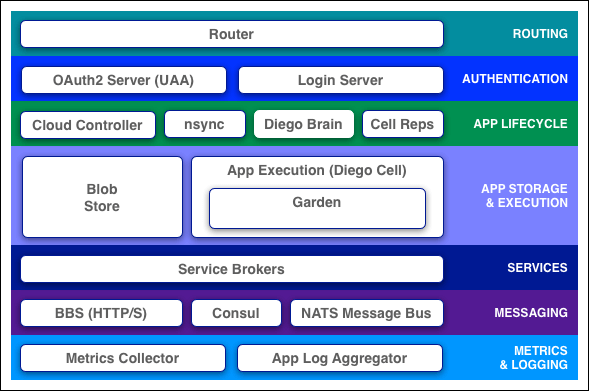
Clouds balance their processing loads over multiple machines, optimizing for efficiency and resilience against point failure. A Cloud Foundry installation accomplishes this at three levels: 

- The BOSH system creates and deploys virtual machines (VMs) on top of a physical computing infrastructure, and deploys and runs Cloud Foundry on top of this cloud. To configure the deployment, it follows a manifest document. 

- The CF Cloud Controller runs the applications and other processes on the cloud’s VMs, balancing demand and managing app life cycles. 

- The Go Router routes incoming traffic from the world to the VMs that are running the applications that the traffic demands, usually working with a customer-provided load balancer.


Cloud Foundry designates two types of VMs: 
                             -  Component VMs that consitute the platform’s infrastructure
                             -  Application VMs that host apps for the outside world

Within Cloud Foundry, the Diego system distributes the hosted app load over all the Application VMs, and keeps it running and balanced through demand surges, outages, or other changes. Diego accomplishes this through an auction algorithm. 

To meet demand, multiple Application VMs run duplicate instances of the same application. This means the apps must be portable. Cloud Foundry distributes application source code to VMs with everything needed to compile and run the apps locally.
This includes,
                    1) OS stack that the application runs on
                    2) Buildpack containing all languages, libraries, services etc. that the app uses.
Before sending an app to a VM, the Cloud Controller stages it for delivery by combining stack, buildpack, and source code into a droplet that the VM can unpack, compile, and run. For simple, standalone apps with no dynamic pointers, the droplet can contain a pre-compiled executable instead of source code, language, and libraries.

To organize user access to the cloud and to control resource use, a cloud operator defines orgs and spaces within an installation and assigns Roles to all users: admin, developer, manager, auditor, etc. The User Authentication and Authorization(UAA) server supports access control as anOAuth2 service, and can store user information internally or connect to external user stores through LDAP or SAML. 

Cloud Foundry uses the git system on github to version-control source code, buildpacks, documentation, and other resources. Developers on the platform also use github for their own applications, custom configurations, etc. To store large binary files, such as droplets, Cloud Foundry maintains an internal Blob Store. To store and share temporary information, such as internal component states, CF uses the distributed value-store systems Consul and etcd. 

Cloud Foundry components communicate with each other by posting messages internally via http and https protocol and by sending NATS messages to each other directly. 

As the cloud operates, the Cloud Controller VM, router VM, and all VMs running applications continuously generate logs and metrics. The Loggregator system corrals this information into structured, usable form. 

Typical applications depend on free or metered services such as databases or third-party APIs. To incorporate these into an application, a developer writes a Service Broker, an API that publishes to the Cloud Controller the ability to list service offerings, provision the service, and enable applications to make calls out to it.

Cloud Foundry components include a self-service application execution engine, an automation engine for application deployment and lifecycle management, and a scriptable command line interface (CLI), as well as integration with development tools to ease deployment processes. Cloud Foundry has an open architecture that includes a buildpack mechanism for adding frameworks, an application services interface, and a cloud provider interface. 

Router

The router routes incoming traffic to the appropriate component, usually the Cloud Controller or a running application on a DEA node.

OAuth2 Server (UAA) and Login Server

The OAuth2 server (the UAA) and Login Server work together to provide identity management.

Cloud Controller

The Cloud Controller is responsible for managing the life cycle of applications. When a developer pushes an application to Cloud Foundry, he is targeting the Cloud Controller. The Cloud Controller then stores the raw application bits, creates a record to track the application metadata, and directs a DEA node to stage and run the application. The Cloud Controller also maintains records of orgs, spaces, services, service instances, user roles, and more.

Health Manager

This has four core responsibilities:

  1. Monitor applications to determine their state (e.g. running, stopped, crashed, etc.), version, and number of instances. It updates the actual state of an application based on heartbeats and droplet.exited messages issued by the DEA running the application. 
  2. Determine applications’ expected state, version, and number of instances. It obtains the desired state of an application from a dump of the Cloud Controller database. 
  3. Reconcile the actual state of applications with their expected state. For instance, if fewer than expected instances are running, it will instruct the Cloud Controller to start the appropriate number of instances. 
  4. Direct Cloud Controller to take action to correct any discrepancies in the state of applications. 
Health manager is essential to ensuring that apps running on Cloud Foundry remain available. It restarts applications whenever the DEA running an app shuts down for any reason, when Warden kills the app because it violated a quota, or when the application process exits with a non-zero exit code.

Application Execution (DEA)

The Droplet Execution Agent manages application instances, tracks started instances, and broadcasts state messages. Application instances live inside Warden containers. Containerization ensures that application instances run in isolation, get their fair share of resources, and are protected from noisy neighbors.

Blob Store

The blob store holds: 1. Application code 2. Buildpacks 3. Droplets

Service Brokers

Applications typically depend on services such as databases or third-party SaaS providers. When a developer provisions and binds a service to an application, the service broker for that service is responsible for providing the service instance.

Message Bus (NATS)

Cloud Foundry uses NATS, a lightweight publish-subscribe and distributed queueing messaging system, for internal communication between components.

Metrics Collector and App Log Aggregator: Logging and Statistics

The metrics collector gather metrics from the components. Operators can use this information to monitor an instance of Cloud Foundry. The application log aggregator streams application logs to developers.

Zero Downtime Deployment and Scaling in Cloud Foundry

  • Application instances - Deploy at least two instances of every application. 
  • Components - Distribute across two or more availability zones (Azs).
  • Space - Ensure that you allocate and maintain enough free space on DEAs
  • Resource pools - According to the requirements of your deployment.
  • Scaling platform capacity - Scale platform capacity vertically by adding memory and disk, or horizontally by adding more VMs running instances of Cloud Foundry components.
In the next blog post, I will be describing you on how to deploy an application locally in the machine using Cloud Foundry.